Documentation Mercado Libre
Check out all the necessary information about APIs Mercado Libre.
Documentation
Multi-Origin Stock
In this documentation, you will find important information for each of the flows that will be impacted by this initiative, starting with:
- Seller management.
- Publishing items with multi-origin stock
- Stock management by warehouse
Identify Multi-Warehouse Seller
Note:
Not all sellers will have the functionality activated in their account. Seller activation will be controlled and subject to criteria defined by Mercado Libre, such as the type of logistics they operate, the addresses from which they ship, among others.
To identify that a user has the functionality activated in their account, we will use the "warehouse_management" (multi-origin experience) and "multiwarehouse" (can create more than one warehouse) tags in /users.
Request:
curl -X GET https://api.mercadolibre.com/users/$USER_ID -H 'Authorization: Bearer $ACCESS_TOKEN'Example:
curl -X GET https://api.mercadolibre.com/users/1008002397 -H 'Authorization: Bearer $ACCESS_TOKEN'Response:
{
  "id": 1008002397,
  "nickname": "TETE9326760",
  "registration_date": "2021-10-27T14:48:55.000-04:00",
  "first_name": "Test",
  "last_name": "Test",
  "gender": "",
  "country_id": "MX",
  ...
  "tags": [
    "normal",
    "user_product_seller",
    "warehouse_management",
    "mshops"
  ],
  ...
}
Warehouse Management
Note:
The ability to create locations for the same seller_id is only available from each seller's account through the Mercado Libre panel, in Sales -> Sales Preferences -> My Warehouses.
Search User Warehouses (stores)
To identify the warehouses created by each user, you must use the following endpoint:
Request:
curl -X GET https://api.mercadolibre.com/users/$USER_ID/stores/search?tags=stock_location -H 'Authorization: Bearer $ACCESS_TOKEN'
Example:
curl -X GET https://api.mercadolibre.com/users/1008002397/stores/search?tags=stock_location -H 'Authorization: Bearer $ACCESS_TOKEN'
Response:
{
    "paging": {
        "limit": 50,
        "total": 2
    },
    "results": [
        {
            "id": "100",
            "user_id": "200",
            "description": "my store",
            "status": "active",
            "location": {
                "address_id": 501,
                "address_line": "Calle 31 Pte 260",
                "street_name": "Calle 31 Pte",
                "street_number": 260,
                "latitude": 21.1637963,
                "longitude": -86.8737132,
                "city": "Cancún/Benito Juárez",
                "state": "Quintana Roo",
                "country": "Mexico",
                "zip_code": "77518"
            },
            "tags": [
                "stock_location"
            ],
            "network_node_id": "123451",
            "services": {
                "stock_location": [
                    "cross_docking",
                    "xd_drop_off"
                ]
            }
        },
        {
            "id": "101",
            "user_id": "200",
            "description": "my store 2",
            "status": "active",
            "location": {
                "address_id": 502,
                "address_line": "Calle 30 Pte 300",
                "street_name": "Calle 30 Pte",
                "street_number": 300,
                "latitude": 21.1637963,
                "longitude": -86.8737132,
                "city": "Cancún/Benito Juárez",
                "state": "Quintana Roo",
                "country": "Mexico",
                "zip_code": "77518"
            },
            "tags": [
                "stock_location"
            ],
            "network_node_id": "571615",
            "services": {
                "stock_location": [
                    "drop_off",
                    "self_service"
                ]
            }
        }
    ]
}
Multi-Warehouse Item Creation
The new Item structure, with its User Product and Stock Locations, will be in the following format:
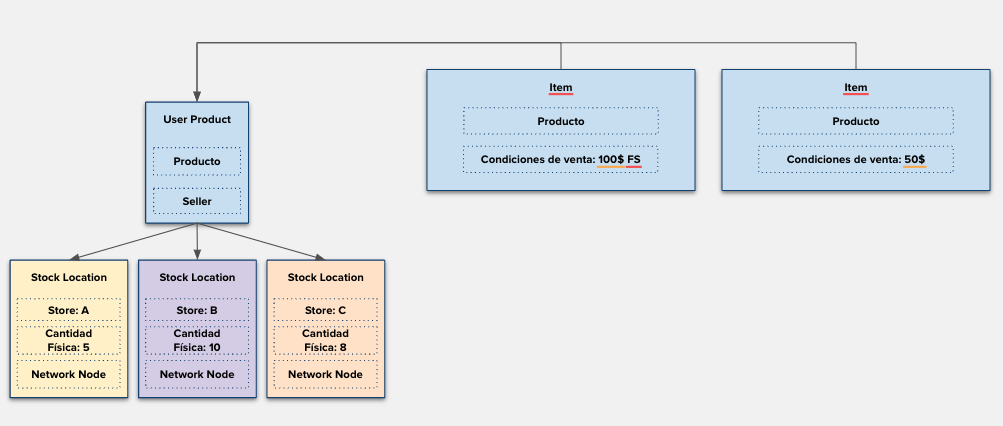
Where the User Product will group all items that match, based on UP rules, but will now also have the Stock_Location entity to group item stock, allowing identification of the available quantity at each warehouse (store).
For creating new items with stock assigned to warehouses, both traditional and catalog items for sellers with the "warehouse_management" tag, you must use the following resource:
Note:
Use the product publishing documentation to learn the complete structure for publishing an Item.
Request:
curl POST --'https://api.mercadolibre.com/items/multiwarehouse' -H 'Content-Type: application/json' -H 'Authorization: Bearer $ACCESS_TOKEN' -d
    {
        "title": "Item Tomato Can",
        "category_id": "MLB455668",
        "price": 1000,
        "listing_type_id": "gold_special",
        "currency_id": "ARS",
        ...
        "channels": [
            "marketplace"
        ],
        "stock_locations": [
       {
        "store_id": "123456",
          "network_node_id": "123451",
          "quantity": 10
       }
       ...
    ]
    }
Response:
{
    "id": "MLM2198240631",
    "site_id": "MLM",
    "title": "Item Tomato Can",
    "seller_id": 123456789,
    "category_id": "MLM191212",
    "user_product_id": "MLMU123456789",
    "price": 1000,
    "base_price": 1000,
    ...
    "channels": [
        "marketplace"
    ],
    "stock_locations": [
        {
            "store_id": "123456",
            "quantity": 10,
            "network_node_id": "MXP123451"
        }
    ]
 }
Response Status Codes:
| Code | Message | Description | Recommendation |
|---|---|---|---|
| 201 | OK | Item created | - |
| 400 | the fields [stock_locations] are required for requested call | stock_locations field not found in the request | Include at least one of the seller's stores to create the item |
| 400 | store does not belong to seller: 000 | The store ID does not belong to the specified user | Review the seller's stores |
| 400 | store not found: 000 | The store ID does not exist | Review the seller's stores |
| 400 | the fields [available_quantity] are invalid for requested call | The available_quantity field is not allowed for this user | Once the user has the warehouse_management tag, they can no longer publish with available_quantity; they must include stock_locations |
Considerations:
- Both the store_id and network_node_id will be in the response when searching for the seller's stores.
- After publishing, it will no longer be possible to find stock_location in the Item request; you must start using the user_product stock query resource.
- You must save the user_product_id from the response, as it will be used later for stock management.
Query Warehouse Stock Details (User Products)
To query the stock of warehouses, use the following endpoint indicating the user_product_id of the created Item.
Request:
curl -X GET https://api.mercadolibre.com/user-products/$USER_PRODUCT_ID/stock -H 'Authorization: Bearer $ACCESS_TOKEN'Example:
curl -X GET https://api.mercadolibre.com/user-products/MLMU123456789/stock -H 'Authorization: Bearer $ACCESS_TOKEN'Response:
{
    "locations": [
        {
            "type": "seller_warehouse",
            "network_node_id": "123451",
            "store_id": "9876543",
            "quantity": 15
        },
        {
            "type": "seller_warehouse",
            "network_node_id": "571615",
            "store_id": "9876553",
            "quantity": 25
        }
    ],
    "user_id": 1234,
    "id": "MLMU123456789"
 }
Stock Management by Location
Note:
In the previous step, when querying stock, the header "x-version" will be returned, which will have an integer value (long type) representing the current stock version. This header must be sent when performing a PUT on /stock/. If it is not sent, a 400 bad request error will be returned.
To modify the stock of each warehouse, you must have the user_product_id, store_id, and network_node_id beforehand.
The following PUT will change the current stock of each warehouse (store). If the store has 0 stock, the quantity from the PUT will be assigned.
Request:
>curl -X PUT https://api.mercadolibre.com/user-products/$USER_PRODUCT_ID/stock/type/seller_warehouse -H 'x-version: $HEADER' -H 'Content-Type: application/json' -H 'Authorization: Bearer $ACCESS_TOKEN'Example:
curl -X PUT https://api.mercadolibre.com/user-products/MLMU123456789/stock/type/seller_warehouse -H 'x-version: 1' -H 'Content-Type: application/json' -H 'Authorization: Bearer $ACCESS_TOKEN' -d '
    {
    "locations": [
       {
        "store_id": "123456",
        "network_node_id": "MXP123451",
          "quantity": 10
       },
       {
        "store_id": "123457",
          "network_node_id": "MXP571615",
          "quantity": 5
       },
       {
        "store_id": "123458",
          "network_node_id": "MXP725258",
          "quantity": 20
       }
    ]
    }
Response:
{
    "user_id": 123456789,
    "product_release_date": null,
    "id": "MLMU123456789",
    "locations": [
        {
            "store_id": "123456",
            "network_node_id": "MXP123451",
            "type": "seller_warehouse",
            "quantity": 10
        },
        {
            "store_id": "123457",
            "network_node_id": "MXP571615",
            "type": "seller_warehouse",
            "quantity": 5
        },
        {
            "store_id": "123458",
            "network_node_id": "MXP725258",
            "type": "seller_warehouse",
            "quantity": 20
        }
    ]
 }
Response Status Codes:
| Code | Message | Description | Recommendation |
|---|---|---|---|
| 200 | OK | Successful update | - |
| 400 | Missing X-Version header | "x-version" header not provided | You must provide the "x-version" header |
| 409 | Version mismatch | The "x-version" header provided is incorrect | Make a GET request to /user-product to obtain the updated "x-version" header |
| 400 | store does not belong to seller: 000 | The store ID does not belong to the specified user | Review the seller's stores |
| 400 | store not found: 000 | The store ID does not exist | Review the seller's stores |
| 400 | store is not configured to be a stock location | The store is not configured for multi-origin | Advise the seller to review the store through the Mercado Libre panel |
| 400 | store cannot be null or empty | Store field not provided | Include at least one of the seller's stores to update the UP stock |
Note:
For post-sale, refer to the Orders and/or Shipping documentation to learn about orders with stores through the "node_id" field.
Next documentation: Distributed Stock