Documentation Mercado Libre
Check out all the necessary information about APIs Mercado Libre.
Documentation
User Products
In the previous seller listing model, it was possible to create variants that group different options of the same product, for example, a shirt in various colors or sizes. These variants allow offering related products within the same listing. However, this model has several limitations:
- It is not possible to set different prices per variant.
- It is not possible to configure different shipping methods per variant.
- It is not possible to apply specific promotions or payment installments to one variant and not to others.
Our goal is to adopt a new model that solves these problems and unifies the experience, decoupling the sales conditions to allow differences for each variant and thus scale listings.
From this, the idea of creating "User Products" emerges, where the initiatives to work on will be:
This approach will allow greater flexibility in listing configuration, enabling specific prices and stock management for each variant, which will improve the buyer experience and efficiency in sales operations.
Important Concepts
To understand the User Product (UP) model, it is essential to consider the following concepts:
- Item:
- It is the representation of a product listing that a buyer views on the platform.
- Contains information related to sales conditions (price, installments, etc.).
- Each item has a unique identifier (item_id) associated with it.
- User Product (UP):
- Represents a physical product that a seller owns and offers through the platform.
- A UP describes the product in the most specific way possible (at the variation level).
- Each UP has a unique identifier (user_product_id) automatically assigned by the system.
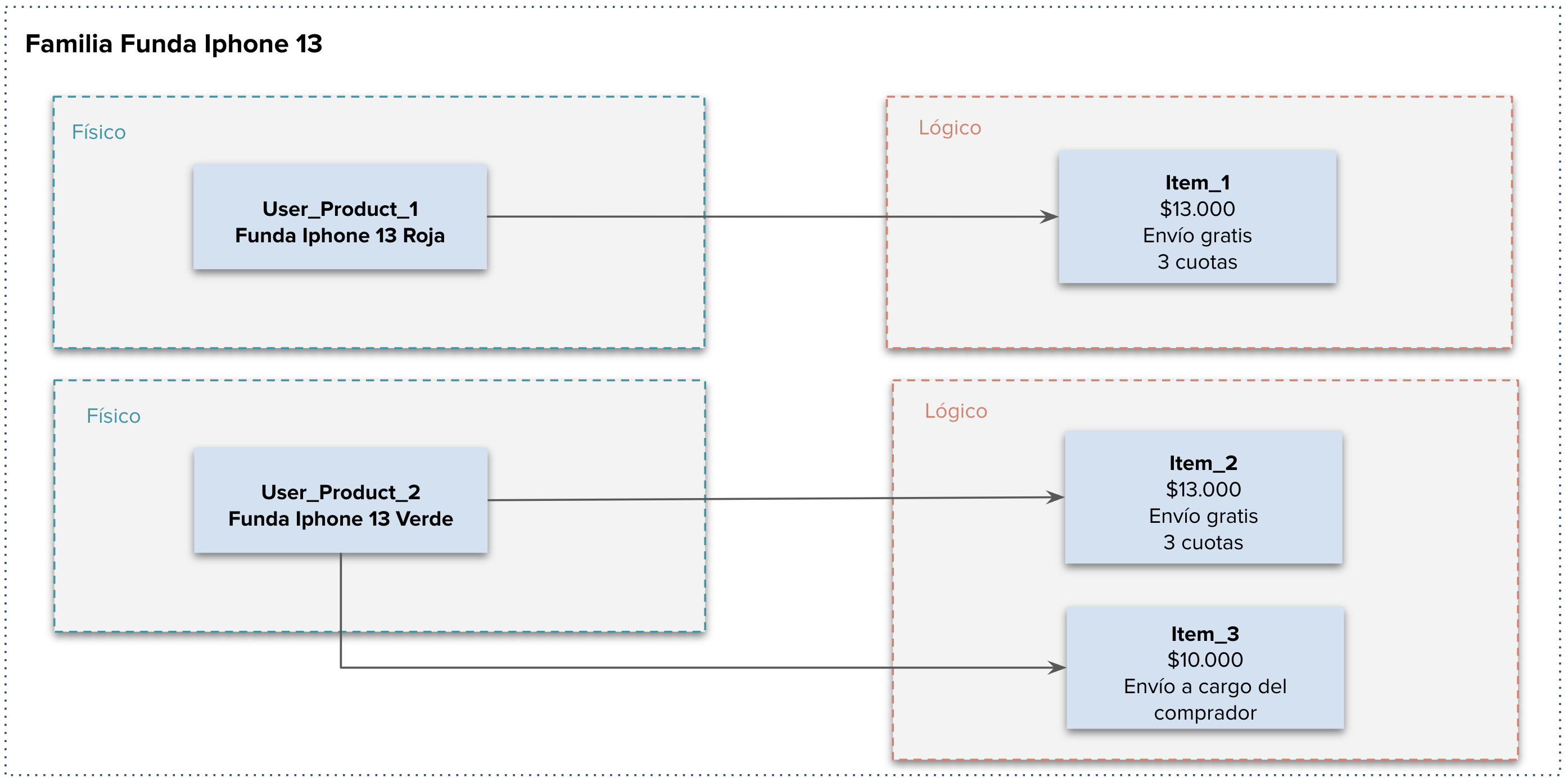
- It can be associated with one or more items. E.g., a red iPhone (the UP) can be in item1 with 3 installments and in item2 with a different price.
- Every UP can be viewed on Mercado Libre through a User Products Page (UPP).
- Family:
- It is auto-generated based on product information.
- Each UP belongs to a family (family_id), and each family groups several UPs.
- Items in the same family will have the same family_name and will be represented as different pickers in the UPP. Pickers are the options offered to a buyer to purchase a product, including different sales conditions and attributes, for example, color.
- To group User Products into a family, the attributes marked as PARENT_PK are considered, which must have the same values in all products of the family. The CHILD_PK and custom attributes only contribute their id and name to the calculation, allowing their values to vary between products of the same family. Read_only attributes are not considered. Thus, a family brings together products with the same main characteristics and allows variations.
- The fields used to define a family are:
- Name (if family_name exists, we prioritize family_name over name)
- Domain_id
- User_id
- Attributes:
- PARENT_PK
- CHILD_PK
- Custom Attributes
- Item Condition
- Modifications to items through the PUT to the /items resource that refer to User Product characteristics will be replicated by Mercado Libre asynchronously to all items associated with the same User Product. The item fields that are synchronized are:
- For fashion items, the size guide will be shared by the variation (User Products) and its sales conditions (items).
Below, to illustrate the concepts mentioned above, we present a comparison between a listing in the previous model vs the endgame with User Products.
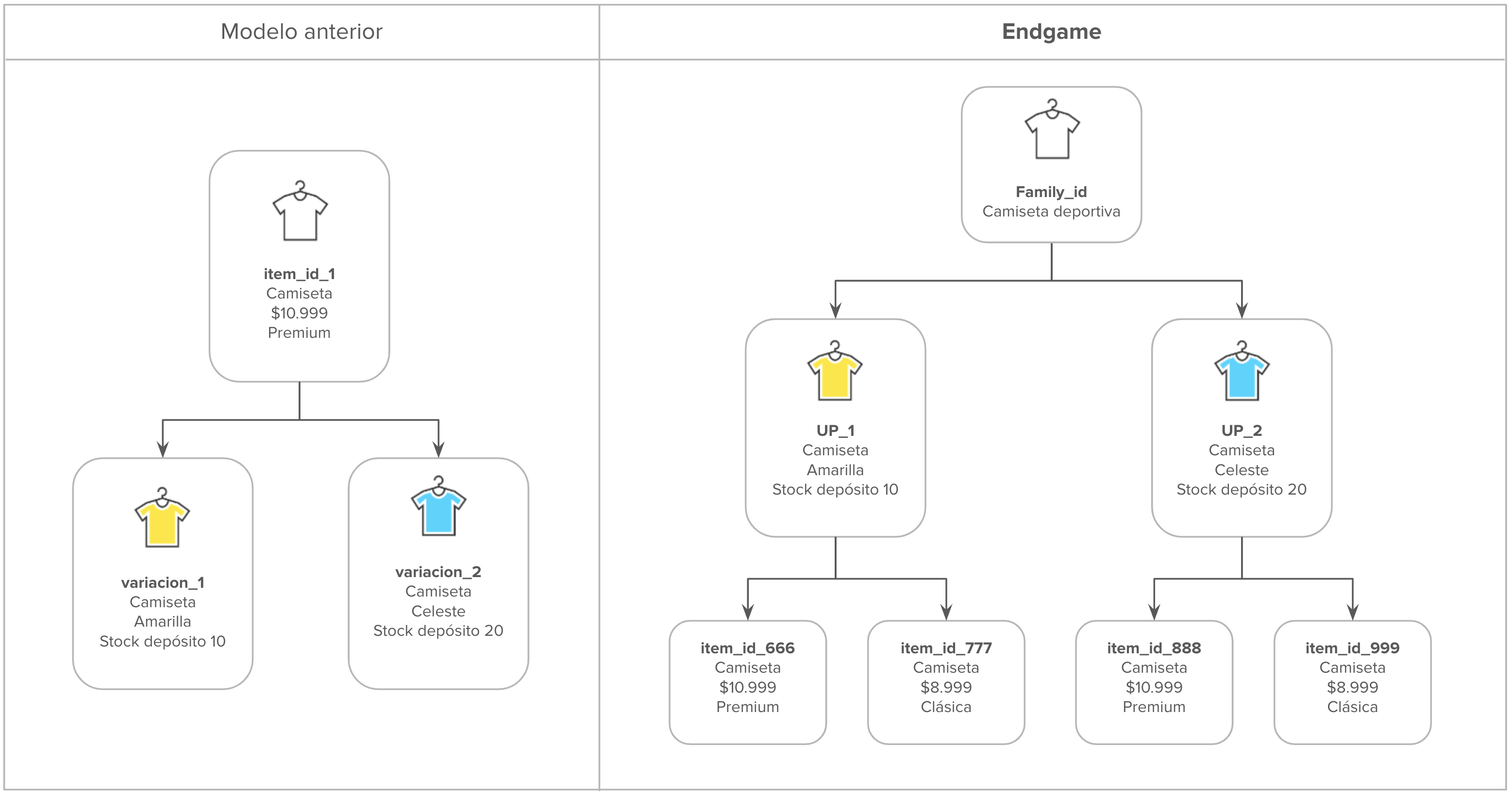
Based on the new model, we present an example of a family and its composition both in UP and in its items and sales conditions:
FAQs
Price per Variation
What type of integrators should adapt their developments to this initiative?
The Price per Variation and UPtin initiative applies to all integrators who publish, synchronize, or even display listing lists for sellers. The Distributed Stock and Multi-origin initiative applies to all sellers who publish, synchronize, or retrieve information from orders and shipments.
What impact will I have if I don't implement the initiative?
Once sellers are activated to start publishing under the new Price per Variation model, if the integrator is not adapted to the changes, it will not be possible to publish with the previous model (using title and variations array).
For integrators who synchronize items, update stock, price, or store item information in their databases, they must take into account the new stock modification structure (at UP level) and also receive notifications of changes due to item migration to maintain data consistency in their databases.
Finally, for integrators who list publications, they should consider updating their frontend to adapt to the value proposition that Mercado Libre will provide with this initiative. That is, grouping items by family, by user product, and also (in cases of publishing or modifying) allowing different sales conditions to be established for each variation.
How can I identify sellers who are already under the new Price per Variation model?
Through the "user_product_seller" tag in the /users API.
How can I identify items that are already in the Price per Variation model?
By validating if the item has family_name different from null. This will happen in:
- Items/Live Listings (LL) that have already gone through the UPtin process.
- New items (NOLs) that were published after the seller was assigned the "user_product_seller" tag.
Will catalog items have the user_product_listing = true tag?
No.
How can I test the User Products flow?
To test the new flows, we request that you do so through this form. Every 7 days, we will activate these new users.
Will all sellers be enabled to work with price per variation?
In the endgame, yes, all sellers will be enabled to use it. Starting in October 2024, sellers will be progressively enabled until reaching 100% of sellers in 2025.
Will all items have user_product_id, family_id, and family_name?
- Prior to activating the "user_product_seller" tag: Live Listings will have user_product_id and will not have family_name. The relationship between user_product_id and item_id will be 1:1.
- After activating the "user_product_seller" tag: a unification process will be carried out for mono-variant and non-variant items, in order to group items that should belong to the same user_product_id, allowing a user_product_id to be associated with 1 or more items. After unification, items will have the family_name attribute.
- When the seller decides to migrate a multi-variant item to the new model (UPtin). In this case, the new items generated will be associated with the same user_product_id and will also have family_name.
Until when can the seller publish in the old model?
Until the activation of the "user_product_seller" tag. After activation, new items must be created under the new model.
Is there an endpoint to list all families of a seller?
No, it currently does not exist.
How can I get all items that belong to the same family?
By making the following requests:
- GET to /items to obtain the user_product_id
- GET to /user-products/$USER_PRODUCT_ID to obtain the family_id
- GET to /sites/$SITE_ID/user-products-families/$FAMILY_ID to get all User Products associated with a family
- GET to /users/$SELLER_ID/items/search?user_product_id=$USER_PRODUCT_ID to get all items associated with a user product. You can send multiple user_products_ids in the parameter as a list, example: GET /users/$SELLER_ID/items/search?user_product_id=MLAU1234,MLAU12345
What size should the family_name entered by the seller during publication be?
The family_name that can be entered must be less than or equal to the domain's "max_title_length".
Is it possible to update the family_name?
Yes, only when none of the sales conditions associated with the User Product have sales. Keep in mind that if an item is associated with a UP with multiple items, the family_name can be updated and will be synchronized with all items of the UP.
When changing the sales condition of a User Product, will its family_name also be changed?
It should not be changed, as family_name is not related to sales conditions (for example, price, listing type).
Will the family_name be managed by the integrator? That is, will Meli not change the value of this field?
Yes, it is the responsibility of the seller/integrator. Only in the case of UPtin, Mercado Libre will create the family_name for the item.
Can I publish with custom type attributes in the Price per Variation model?
Yes, you can publish by adding the attribute, example:
{
	"attributes": [
		{
			"name": "my-custom-attribute-name",
			"value_name":"my-custom-attribute-value"
		}
	]
}
Will the /categories resource continue to work the same way so we can query attributes and their tags? For example, allow_variations and variation_attribute.
Yes, you can even use these attributes as a reference (not a rule) to understand which attribute will be used for the completion of the publication's family_name.
Will it be possible to send the variations array after a seller is activated to work with Price per Variation?
No, you will not be able to send the array, because each variation will be a different User Product.
UPtin
Will items in the previous model automatically migrate to the new model?
Once the Price per Variation model is activated for the seller (they have the "user_product_seller" tag), items without variants will be automatically migrated by Mercado Libre to the new model.
Are all items candidates to migrate to the new Price per Variation model?
No, it is necessary to use the eligibility endpoint to validate if the item can be migrated.
When the seller migrates a publication with 3 variants from the current model to the User Products model, how will the creation notification be sent?
You will receive a notification for each item created through the items topic. The old item will have status closed and each new publication created will have the "variations_migration_uptin" tag.
What will happen to the sales information from old publications?
The sold_quantity field will reflect the same sales as the variant's sold_quantity, however the old orders will remain associated with the old item_id.
Distributed Stock and Multi-origin
How will the new and old world coexist?
When a seller is configured for multi-origin, all items become managed as multi-origin as well; there is no distinction between the old model and the new model.
Can the same listing be in more than one warehouse (stock_location) of the seller?
Yes, sellers who have Multi-origin active (warehouse_management tag) can distribute stock across their different stock_locations. Learn more about how to distribute stock in the Multi-origin Stock documentation.
Once the seller is enabled for multi-origin, how should stock be distributed for listings that are in the old model?
Once the seller is enabled for multi-origin, stock must be managed with the PUT to seller_warehouse.
Help Us Improve
We recommend complementing this reading with our Devsite documentation, including the following documentation. However, if you have more questions regarding User Products, you can submit your questions through this form this will help us complement this document.
Next: Price per Variation.